APROVERO
SELF-HOSTED EXPERIMENTS · LEARNING SYSTEMS · MEXICO CITY

The Lab

Learning systems by building and operating them.

aprovero.org · Cloudflare Pages · Mexico City

This homelab isn’t a fabricated enterprise showcase or a data center rack tucked into a closet. It is an evolving, hands-on learning environment built on hardware that was already sitting in a drawer.

The primary purpose is practical education: giving old hardware a useful second life, learning Docker, Linux administration, networking, and self-hosting through daily operational use, building genuinely useful household services, and proving use cases before spending money on dedicated infrastructure. Reducing cloud subscriptions is a welcome side effect, but it is not the main driver.

Note on site hosting: This website is part of the experiment, but it isn’t currently served from the ASUS. The source lives in GitHub and Cloudflare Pages automatically builds and serves aprovero.org. Moving it home is still an option, but I haven’t decided whether self-hosting the public site adds enough value to justify the additional operational responsibility. Self-host where it makes sense, not simply because it is possible.

Origin Story

2013 Hardware · ~MXN 250 Total Investment

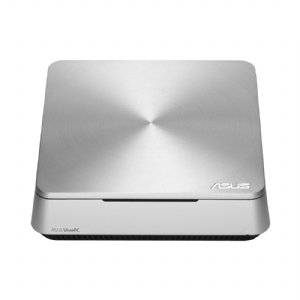
The current homelab started with an older ASUS VivoPC VM40B that was sitting unused. Years ago, it served as my media server when I lived in Argentina, but after moving it had been collecting dust on a shelf.

The immediate trigger for bringing it back was automation. I was starting to bump against the execution limits of Make’s free tier and wanted to experiment with self-hosted n8n. My initial idea also included running a local LLM to assist with tasks and data categorization.

The modest hardware quickly delivered a dose of reality: meaningful local LLM workloads were simply not realistic on this processor. But instead of abandoning the machine, the scope naturally expanded:

If a small server is already running 24/7, what other useful services can reasonably be brought home?

Over time, the lab transformed into a real platform to learn Docker, Linux administration, networking fundamentals, local DNS, reverse proxies, persistent storage permissions, automation pipelines, and potential self-hosted alternatives for paid cloud services.

The entire proof of concept required almost zero new capital. I already owned the PC and external drives. The only new hardware purchase was approximately MXN 250 for an 8 GB stick of DDR3 RAM to bring the machine up to 12 GB. The hardware wasn’t chosen through deliberate optimization—it was simply what was on hand.

Current Server & Host

ASUS VivoPC VM40B
[ HARDWARE: ASUS VIVOPC VM40B ] HEADLESS · 24/7 OPERATION
ASUS VivoPC VM40B running headless Ubuntu Server and Docker containers in Mexico City
"The hardware wasn't selected for the job. It was what I had." The local LLM idea is still alive. The current Celeron just strongly disagrees.
Host Hardware
  • Model: ASUS VivoPC VM40B (~2013-era)
  • Processor: Intel Celeron (No dedicated GPU)
  • Memory: 12 GB DDR3 RAM
  • Duty Cycle: 24/7 continuous operation
  • Power: Standard wall power (No UPS today)
OS & Storage Layout
  • Host OS: Ubuntu Server (Runs headless)
  • Container Engine: Docker via CasaOS & Portainer
  • Internal Drive: 1 TB HDD (workloads & container data)
  • External Drive 1: Media storage & large files
  • External Drive 2: Dedicated server backups

Management: CasaOS & Portainer

All application workloads run as isolated Docker containers on top of headless Ubuntu Server.

For everyday operations, I use CasaOS as the dashboard GUI. I originally tried it because it was widely recommended, and I kept it because it works well enough for daily visibility, launching services, and one-click app installs. It is not an enterprise architecture decision; it is simply a convenient lens into the server. When deeper container inspection, compose stack management, or granular volume configuration is needed, I step into Portainer or the command line.

Monitoring is kept straightforward: I use DaRemote on my phone for manual status checks alongside CasaOS and Portainer. There is no automated telemetry, Prometheus, or Grafana cluster running behind the scenes.

Architecture Overview

Sanitized Topology

The network architecture follows a strict principle: most services stay private. Access occurs locally over Wi-Fi or remotely through Tailscale. A container is only given outbound or inbound tunnel connectivity when an external technical requirement (such as an incoming webhook for n8n) demands it. Administrative interfaces are never exposed to the public internet.

+=============================================================================+
|                      PUBLIC EDGE (SEPARATED HOSTING)                        |
|                                                                             |
|   GitHub Repo  ──[ Automatic CI/CD ]──>  Cloudflare Pages  ──>  aprovero.org|
|                                                                             |
|   * Zero dependence on homelab uptime or residential ISP bandwidth          |
+=============================================================================+

+=============================================================================+
|                      PRIVATE HOMELAB ENVIRONMENT                            |
+=============================================================================+
|                                                                             |
|   [ Private Remote Access ]               [ Selective Webhook Ingress ]      |
|    Tailscale Mesh VPN                      Cloudflare Tunnel (Outbound)     |
|    (Encrypted Admin Channels)              (Strictly for required webhooks) |
|               │                                          │                  |
|               ▼                                          ▼                  |
|   +─────────────────────────────────────────────────────────────────────+   |
|   |  PHYSICAL SERVER (24/7 HEADLESS)                                    |   |
|   |  ASUS VivoPC VM40B (~2013) · 12 GB RAM · Intel Celeron              |   |
|   |  Host OS: Ubuntu Server · Wi-Fi (Static Local Addressing)           |   |
|   |  Storage: 1 TB Internal HDD + External Media & Backup HDDs          |   |
|   +──────────────────────────────────┬──────────────────────────────────+   |
|                                      │                                      |
|                                      ▼                                      |
|   +─────────────────────────────────────────────────────────────────────+   |
|   |  CONTAINER RUNTIME: DOCKER ENGINE                                   |   |
|   |  Visibility: CasaOS (Day-to-day GUI) · Portainer (Deep Management)  |   |
|   +──────────────────────────────────┬──────────────────────────────────+   |
|                                      │                                      |
|         ┌────────────────────────────┼────────────────────────────┐         |
|         ▼                            ▼                            ▼         |
|   [ AUTOMATION ]             [ HOUSEHOLD & MEDIA ]      [ UTILITIES & DNS ] |
|   • n8n (Active dev)         • Immich (Evaluating)      • AdGuard (Testing) |
|     - Smart Budgeting        • Home Assistant (Config)  • Stirling-PDF      |
|     - Smart To-Do            • Jellyfin (TV streams)    • Cloudflared       |
|   • Hermes (Evaluating)      • MeTube (Media downloads) • NPM (Planned)     |
+=============================================================================+

* Security Policy: Sensitive hostnames, IP allocations, internal subnets, credentials, and tunnel identifiers are deliberately omitted. This diagram communicates operational roles, not an attack map.

Current Service Stack

Active Containers

Rather than listing every container image ever downloaded, this catalog reflects the active services running on the machine today. Statuses are manually maintained to truthfully communicate operational maturity.

Portainer

[Management]

Deeper Docker and container lifecycle management when a basic interface is not enough.

Running

n8n

[Automation]

Self-hosted workflow automation engine; gradual replacement for cloud automations previously handled through Make.

↳ Core active development area. Powers multi-stage workflows including smart budgeting and task orchestration.

Active development

Immich

[Household]

Self-hosted photo and video backup; evaluating as an eventual replacement for Google Photos.

↳ Currently operating alongside Google Photos. Full transition will happen only once comfortable with local storage redundancy.

Running

Home Assistant

[Household]

Centralizes control of household smart-home systems to eliminate dependence on multiple vendor apps.

↳ Currently integrating local cameras, smart plugs, and door locks under local control.

Configuring

Stirling-PDF

[Utilities]

Everyday PDF merge, split, and conversion tasks for household and family use without cloud uploads or subscriptions.

Running

Jellyfin

[Media]

Personal media server for local household TV and video streaming.

Running

MeTube

[Media]

Web GUI wrapper for downloading web video and audio streams directly to local storage.

Running

AdGuard Home

[Utilities]

Network-wide ad blocking, tracker reduction, family/child filtering, and local DNS management.

↳ Currently in testing mode; not yet configured as the authoritative DNS resolver for the full household.

Testing

Cloudflared

[Utilities]

Encrypted outbound tunnel providing selective connectivity for external webhooks without opening inbound router ports.

Running

Hermes

[AI]

Local environment for testing AI agent workflows and autonomous task execution.

↳ Installed to explore future local agent patterns; not yet actively powering everyday automations.

Installed / evaluating

Active Projects: Automation

n8n Core Workflows

Self-hosted automations are the heart of why the server was revived. These two projects receive the bulk of active development:

1. Smart Budgeting & Expense Tracking

In Development

Building an automated pipeline to handle personal and household finances without manual data entry or subscription tools.

Intended Functional Direction:
  • Capture and automatically import incoming transaction receipts and statements.
  • Categorize transactions using deterministic logic and pattern matching.
  • Update the central budgeting ledger and summarize monthly spending trends.
  • Flag unusual expenses or sudden changes in recurring subscriptions.
  • Generate periodic financial summaries and reports.
  • Eventually support conversational natural-language queries about account balances and budget limits.
Architecture Note: Actual Budget is currently being evaluated as the dedicated local ledger component. The overall architecture is actively evolving and not yet finalized.

2. Smart To-Do System

In Development

An intelligent task routing workflow designed to capture tasks across varying interfaces and synthesize them into an actionable daily priority agenda.

Intended Functional Direction:
  • Ingest action items from multiple sources (quick notes, email, mobile input).
  • Create, organize, and update tasks with contextual priorities.
  • Identify overdue commitments and resurface forgotten follow-ups.
  • Provide a concise, focused daily view of immediate priorities.
  • Decompose broad, complex tasks into smaller, sequential steps.
  • Eventually enable conversational task capture and status checks.
Storage Note: Currently connected conceptually to Notion as the repository. I also use Supabase for other projects and have considered eventually running a local PostgreSQL container. The architecture is evolving directly from the use case rather than being locked down in advance.

Household Services Platform

Practical Utility

Beyond developer tooling, part of the lab is gradually turning into a small personal and household utility platform. Services like Immich for photo backup, Stirling-PDF for family document processing, Jellyfin for TV streams, MeTube for downloads, AdGuard Home for filtering, and Home Assistant for smart devices all serve real needs.

"The useful test is not whether I can install a container. It's whether anybody actually wants to use it."

Self-hosting household utilities requires a measured approach: services only replace commercial services when they have proven reliable enough not to cause friction.

For example, Immich has backed up my complete photo library, but it operates alongside Google Photos rather than replacing it outright. The complete migration will only happen once I am fully confident in my local storage redundancy and backup routines. Similarly, AdGuard Home is tested on individual devices before taking over as the authoritative DNS server for the whole home.

Learning by Operating

Real Systems · Real Friction

Operating a physical server forces you to confront the practical layers of computing that modern cloud abstractions sweep under the rug. I am not an experienced Linux systems administrator—I am learning as I go.

"This isn't a polished production environment. It's a working lab where I'm learning Docker, Linux, networking, self-hosting and automation by actually using them."

Running this modest machine has provided hands-on experience with:

  • Docker containers & multi-container networking
  • Persistent storage volumes & bind mounts
  • Linux user permissions & UID/GID mapping
  • Headless Ubuntu Server maintenance
  • Local DNS resolution & split-horizon routing
  • Reverse proxies & SSL certificates
  • Tailscale private overlay networking
  • Cloudflare outbound tunnels
  • Diagnosing failing containers & debugging logs
  • Physical drive organization & backup routines

CasaOS made the initial on-ramp easy, but it quickly highlighted where a GUI is no longer enough and understanding what Docker is doing underneath becomes essential.

"I still break things. Then I figure out why."

Local AI Direction

Future Roadmap

Running a local large language model was part of the original motivation for bringing the ASUS back to life. However, running meaningful inference on a 2013 Celeron without a dedicated GPU quickly proved unworkable.

The ambition, however, remains central to the future direction of the lab. Once compute permits, the intended roles for a local model include:

  • Serving as a general-purpose private personal assistant.
  • Assisting with n8n workflow execution and unstructured data ingestion.
  • Parsing receipts, invoices, and expense descriptions for the budgeting project.
  • Eventually integrating with automated household routines.

Potential user interfaces under consideration include a simple web chat, direct n8n webhook triggers, messaging channels (such as Telegram or WhatsApp), or voice control via Home Assistant.

Undecided Architecture: No model family, GPU architecture, inference framework, or vector database has been locked down. Hardware and software decisions will be made when actual workloads demand them.

What's Next

Uncommitted Direction

The homelab evolves as time and practical needs dictate. There are no arbitrary launch dates or firm commitments, but these items represent the near-term trajectory:

1. Wired Ethernet Migration

Move the server from its current Wi-Fi connection to wired Ethernet if daily homelab use warrants the cabling.

2. Expand n8n Automations

Continue building out the smart budgeting and smart to-do pipelines; gradually retire legacy Make workflows.

3. Nginx Proxy Manager

Configure NPM for cleaner internal service routing and local domain resolution without port memorization.

4. Actual Budget Integration

Evaluate Actual Budget as the local ledger component for automated expense recording.

5. Hermes Active Evaluation

Begin hands-on testing of the existing Hermes container to assess practical AI agent patterns.

6. Home Assistant Deepening

Continue integrating household smart plugs, cameras, and locks into centralized local automations.

7. Storage Redundancy

Improve drive redundancy and automated backup scripts as more household data moves onto the machine.

8. Future Hardware & Local AI

If the homelab proves genuinely useful, eventually replace the ASUS with more capable compute to revisit local LLMs.

Any future hardware upgrade will be driven strictly by actual operational workloads, not anticipation.